


Chicken Salad Chick
4.82.55K Reviews
App Specs
- Version
- 4.2.23
- Updated On
- License
- Free
- Downloads
- 500,000+
- Developer
- Chicken Salad Chick
- Categories
- Lifestyle
- Platform
- Android
Screenshots
 Analysis by AppCompare
Chicken Salad Chick is the kind of app I would keep installed for one simple reason: it makes repeat visits to Chicken Salad Chick easier to organize. This free lifestyle app, developed by Chicken Salad Chick, combines the restaurant’s loyalty program with online ordering, so the useful question is not whether it replaces every food app on your phone, but whether you visit this particular restaurant often enough to benefit from having its rewards and ordering tools together.
In my experience, that focus is both its biggest strength and its main limitation. If Chicken Salad Chick is already part of your lunch routine, the app gives you a more direct way to earn points, redeem rewards, and place an order. If you are only looking for a general restaurant-discovery service, delivery marketplace, or broad coupon app, this is much narrower. I would recommend it to regular customers and families who order from the chain repeatedly, while occasional visitors may find that a normal web visit or in-person order is enough.
How the app fits into a regular Chicken Salad Chick routine
I’d treat the app as a household planning aid, not as a shared account by default. Before a family order, I’d have everyone settle on what they want, then let one person review the choices and handle the order; that reduces last-minute confusion and keeps the loyalty activity tied to the account actually being used. The next question is how to keep that routine convenient without blurring personal account boundaries.
A focused loyalty tool rather than a general food app
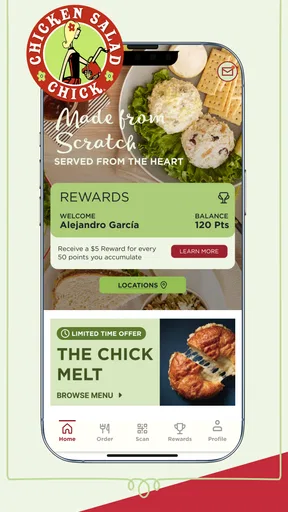
The app’s purpose is refreshingly clear. It is built around Craving Credits, the loyalty side of the Chicken Salad Chick experience, with online ordering placed alongside it. That means the app is most valuable before a visit and during the ordering process, rather than as a source of restaurant reviews, meal planning, grocery ideas, or broad lifestyle content.
I like this narrower approach because it avoids making me search through unrelated restaurants or promotions. When I already know I want Chicken Salad Chick, a dedicated app can be quicker than opening a marketplace and filtering through menus. The trade-off is obvious: its usefulness depends almost entirely on how often you choose this restaurant.
The app is free, carries an Everyone content rating, and supports devices running Android 7.0 or later. Those details make it accessible to a wide range of Android users, including people who do not have a recent phone. It has also built a substantial audience, with over 500 thousand installs, while its average rating sits at 4.8 from around 19 thousand ratings. Those figures suggest that the core experience works well for many customers, although a high rating should not be treated as a guarantee that every ordering situation will be smooth.
What I would use it for first
My first use would be a planned lunch order. I could open the app before leaving work, check the available ordering flow, apply any usable reward, and arrange the meal without standing in line. For a family order, the same process is more practical because I can decide what everyone wants before reaching the restaurant instead of trying to remember several choices at the counter.
Worth Reading Before You Choose

EA SPORTS FC Mobile 26 Is a Bigger Football Game, but It Takes Time

Flipboard Shows What News Apps Must Do Beyond the Feed

Switching to Android Auto Means Rethinking Your Driving Routine

Google Calendar Makes a Crowded Week Easier to Manage

Ludo King Makes the Most of the Minutes Between Plans

Baby Panda World Brings Quick Play to Modern Phones, but Its Game Library Feels Busy
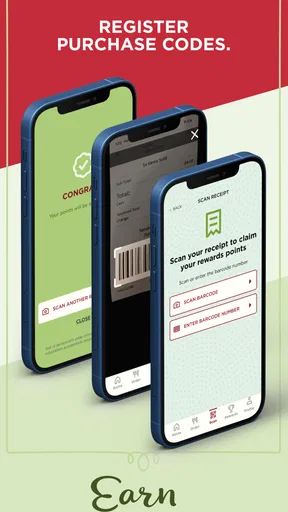
There is also a useful habit-building angle. Rather than treating rewards as an afterthought, I would open the app before paying and make sure the visit is connected to my loyalty activity. That small change matters for people who visit regularly but tend to forget to use restaurant programs. The app gives the rewards process a visible home instead of leaving it buried in email messages, paper receipts, or a third-party ordering account.
Why the dedicated format can be better than a marketplace
General delivery and restaurant apps are convenient when I want to compare many places at once. They can be better for discovering nearby options, checking several menus, or combining orders from different restaurants. However, they may not be the best place to manage a restaurant-specific loyalty relationship. A dedicated Chicken Salad Chick app keeps the restaurant’s own ordering and rewards experience together, which is more useful when I have already made my decision.
The distinction is important. I would use a marketplace when choice is the priority. I would use this app when loyalty, familiarity, and a direct order are the priority. Neither approach is universally better, and installing this app makes most sense when Chicken Salad Chick is a repeat destination rather than an occasional experiment.
The current version and what that tells me
The current Android version is 4.2.23. I would not read a version number by itself as proof that the app has been dramatically redesigned, but it does show that the product has moved through multiple iterations since its original release on January 16, 2015. That long lifespan matters for a loyalty app because customers expect the basics—account access, rewards handling, and ordering—to remain dependable as phones and operating systems change.
For an existing user, the practical response is simple: keep the app updated through the normal app store process and check that it still works properly on the device you use for ordering. The minimum operating system requirement is Android 7.0, so owners of very old phones should check compatibility before planning around the app. On a supported device, the current version is the one I would evaluate rather than relying on impressions from early releases.
How I would set up a low-friction workflow
I would avoid waiting until I was hungry and standing outside the restaurant to learn the app. A better workflow is to install it at home, sign in calmly, and explore the rewards and ordering screens before the first important order. That makes it easier to notice whether the account is ready and whether the preferred ordering method feels comfortable.
For repeat visits, I would use the same sequence each time: open the app before choosing a meal, review the loyalty area, decide whether to save a reward or use it now, and then complete the order. This is a small but useful distinction. Redeeming every reward immediately may feel satisfying, but saving one for a larger planned order can sometimes be more convenient. The right choice depends on how often I visit and whether I expect another order soon.
I would also place the order with enough time to handle an unexpected interruption. A dedicated restaurant app can simplify the process, but it cannot remove real-world issues such as a busy location, a changed schedule, or a mistake in an order. Checking the final details before submitting is especially worthwhile when ordering for several people.
What existing customers may notice after updating
Users who have had the app installed for years may notice that the current experience is shaped by ongoing maintenance rather than by the original 2015 release. The version history is not a reason to assume that every screen has changed, but it is reasonable to expect the app to evolve as the restaurant adjusts its digital ordering and rewards experience.
That can be positive for compatibility and usability, yet updates can also require a short adjustment period. A familiar button may move, a sign-in step may look different, or the path from rewards to ordering may be reorganized. My advice is to avoid updating for the first time moments before an important meal. Open the app after an update when you have time to confirm that your account and preferred workflow still make sense.
For someone switching from a browser, the app may feel more convenient because it keeps the restaurant experience in one place. For someone who already uses a third-party service successfully, the benefit is less automatic. The deciding factor is whether direct loyalty management is worth adding another app to the phone.
Where the experience still has boundaries
The biggest gap is its limited scope. This is not a general food-planning companion, and it is not designed to help me compare Chicken Salad Chick with other restaurants. If I want broad discovery, independent reviews, delivery comparisons, or a single account for many chains, another service will be more suitable.
There is also a practical commitment involved in loyalty programs: I need to remember to use the correct account and ordering route. A reward system only helps when visits are properly connected to it. If I switch casually between in-person purchases, different ordering services, and guest checkout, the experience may feel less organized than it appears on paper. That is not a reason to avoid the app, but it is a reason to choose one consistent routine.
Online ordering can save time, but it is not always the fastest choice for a very simple visit. If I am already beside the counter and know exactly what I want, opening the app, checking the order, and completing the process may add unnecessary steps. I would use it when planning, customizing, ordering for others, or managing rewards—not automatically for every visit.
Another limitation is that a restaurant-specific app is only as useful as the locations and ordering options relevant to the customer’s routine. Someone who travels frequently or visits several restaurant brands may prefer a broader tool. This app is strongest when the same restaurant is part of a predictable local pattern.
Who should install it, and who should skip it
I think it is a good fit for regular Chicken Salad Chick customers, people who like ordering ahead, and families who want a repeatable way to manage restaurant rewards. It is also worth considering for anyone who frequently forgets loyalty cards or dislikes searching through messages for reward information. The dedicated format makes the restaurant relationship easier to revisit.
I would skip it if I rarely eat at Chicken Salad Chick, already have a faster ordering method that satisfies me, or mainly want a universal restaurant app. Installing a separate app for a single restaurant is not automatically worthwhile. The value comes from repeated use, not from the novelty of having another ordering icon.
It may also be the wrong choice for someone who prefers speaking with staff for every order or who does not want to manage digital rewards. In that case, the app’s main advantages—planning, online ordering, and loyalty tracking—will not outweigh the extra step of using it.
Questions I would consider before relying on it
Would I need an internet connection? For the central tasks, I would plan on being online because account-based rewards and online ordering depend on communication with the service. I would not wait until I was in a weak-signal area to create an order or try to manage a reward. Preparing earlier is the safer approach.
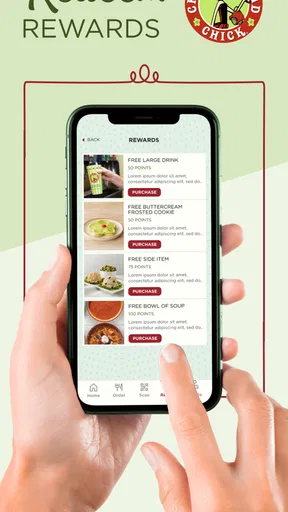
Is it better to redeem rewards immediately or save them? I would base that on visit frequency and the size of the order. Frequent customers may prefer to use rewards regularly, while someone planning a larger family meal may want to keep a reward for that occasion. The important point is to review the rewards area before submitting the order rather than assuming the best option will be selected automatically.
Can it replace a delivery marketplace? I would not treat it as a universal replacement. Its role is the Chicken Salad Chick ordering and loyalty experience. A marketplace remains more useful when I need restaurant comparison, broader delivery choices, or several brands in one place. The dedicated app wins when I already know where I want to eat.
Will an older Android phone run it? Devices need Android 7.0 or later. If the phone meets that requirement, I would still install and test the app before depending on it for a time-sensitive order, particularly if the device has limited storage or an older browser component.
Is the app suitable for children? Its Everyone rating indicates broad age suitability, but the actual activity involves restaurant ordering and account use. I would still have an adult manage payment, account details, and the final submission. The rating describes content suitability, not independent purchasing responsibility.
What I would watch in future updates
For future versions, I would pay attention to whether the rewards and ordering paths remain equally easy to reach. Those are the two reasons to use the app, so any update that adds confusion between them would weaken the experience. I would also look for improvements that reduce repeated sign-ins, clarify reward use, and make order review easier without adding unnecessary screens.
Existing users should watch for changes after updates rather than assuming their old routine is unchanged. A quick test order review, a check of the account area, and a glance at available rewards can prevent surprises on a busy day. New users should judge the app after completing a realistic task, such as preparing a planned lunch order, rather than after simply opening the home screen.
My final take after using the restaurant-focused approach
Chicken Salad Chick succeeds because it stays close to a clear everyday need: connecting Craving Credits with online ordering for customers who already choose the restaurant. Its free price, Everyone rating, broad Android compatibility from version 7.0 onward, and strong average rating of 4.8 make it an easy app to try for regular customers. The developer, Chicken Salad Chick, has also kept the product active through its current version, 4.2.23, rather than leaving it tied to its original 2015 launch.
I would recommend it to a friend who visits the chain often, especially if that friend wants a dependable routine for checking rewards before ordering. I would not recommend installing it solely because every restaurant has an app. For occasional customers, a browser or in-person visit may be simpler; for restaurant explorers, a broad marketplace is more useful.
My honest verdict is that this is a practical, specialized lifestyle app rather than an essential tool for everyone. When the restaurant is already part of your week, its focused design can save small amounts of time and make loyalty benefits easier to remember. When it is not, the narrow scope becomes hard to justify. That clear difference is exactly what potential users should consider before downloading it.
Pros
- Menu offers varied chicken salad flavors and Southern-inspired sides.
- Convenient ordering makes pickup and delivery easy in supported areas.
- Portions are generally filling for a quick lunch or light dinner.
- Store locator helps users find nearby restaurants and check opening times.
- Simple interface makes browsing the menu and placing orders straightforward.
Cons
- Availability and delivery options depend heavily on your local restaurant.
- Some menu items can be relatively expensive for their portion size.
- Nutrition details may not be equally comprehensive for every menu item.
- Promotional offers and rewards may vary by location or change frequently.
- The app has limited usefulness if there is no nearby Chicken Salad Chick.
FAQs for Chicken Salad Chick
What is Chicken Salad Chick?
Chicken Salad Chick is a restaurant brand and mobile app experience focused on chicken salad meals, sandwiches, soups, sides, desserts, and beverages. Depending on your location, the app can help you browse the menu, view available flavors, find nearby restaurants, place pickup or delivery orders, and discover current promotions. Menu availability and services may vary by restaurant.
Can I order Chicken Salad Chick meals through the app?
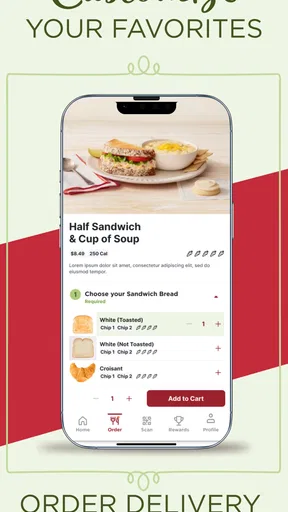
Yes, the Chicken Salad Chick app generally allows customers to order food for pickup, and delivery may be available in selected areas through participating locations or delivery partners. After entering your address or selecting a restaurant, you can review the menu, customize eligible items, choose a collection time, and complete payment. Always check the final order details before confirming.
Does the Chicken Salad Chick app offer rewards or special promotions?
The app may include a loyalty or rewards program that lets eligible customers earn points, receive member benefits, and access exclusive offers. Registration requirements, reward values, expiration dates, and promotional conditions can change over time. Before relying on a discount, open the offer details and confirm that it applies to your selected restaurant, order type, and menu items.
Is Chicken Salad Chick available everywhere?
Chicken Salad Chick operates at participating locations in selected areas, so the app may not be useful if there is no restaurant near you. Location services or a manually entered ZIP code can help identify nearby stores and determine whether pickup or delivery is supported. Restaurant hours, holiday schedules, menus, and ordering options can differ from one location to another.
Is the Chicken Salad Chick app free to download and use?
The official Chicken Salad Chick app is generally free to download, and creating an account is usually optional for browsing basic restaurant information. However, the cost of your food order, taxes, delivery charges, service fees, and possible minimum-order requirements are separate from the app itself. Review the complete price summary before submitting an order.


